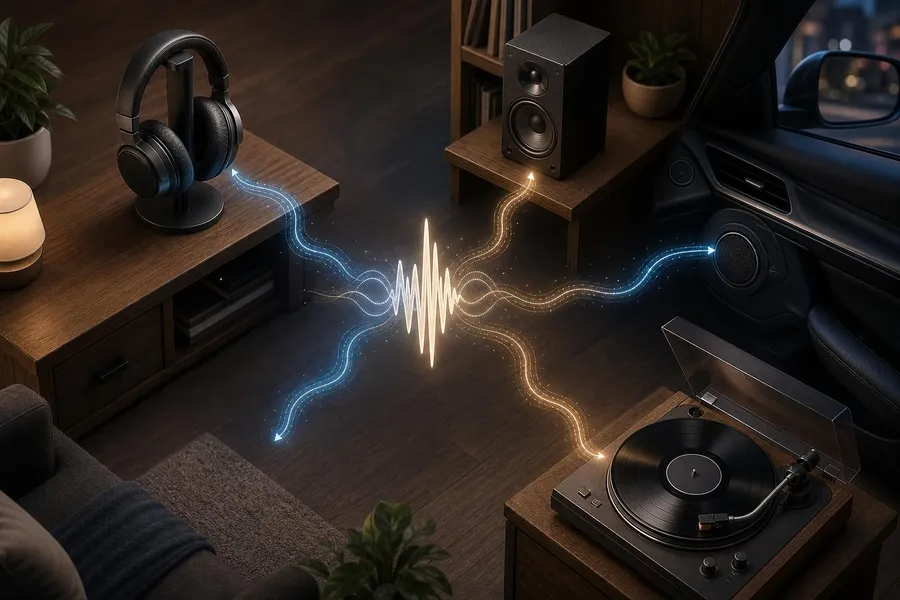
What is audio playback variation? It is the way the same recording changes in tone, loudness, bass, clarity, width, or detail depending on the device, app, connection, and room you use. If your favorite song sounds different on every device, the song usually has not changed. What changed is the playback chain: the master delivered to the platform, the streaming quality, Bluetooth or wired transmission, EQ settings, speaker size, room acoustics, and even how loud you play it. This guide explains why earbuds, car speakers, laptops, smart speakers, TVs, and home systems emphasize different parts of the same track, and how you can make listening more consistent.
Quick summary
A song can sound different because each device has its own speaker size, tuning, amplifier limits, and digital signal processing.
Streaming apps may apply volume normalization, quality settings, spatial audio, or data-saving modes that alter what reaches your headphones or speakers.
Bluetooth can introduce codec differences, while wired listening can reveal more of the source when the hardware is good enough.
Rooms and cars add reflections, resonances, and background noise, so speakers rarely sound like headphones.
You can reduce surprises by checking app settings, turning off unnecessary EQ, comparing at matched volume, and using better-fitting headphones or speakers.
The song is the same, but the playback chain is not
A recorded song passes through several stages before it reaches your ears. It starts with a mix, where vocals, drums, bass, guitars, synths, effects, and stereo placement are balanced. Then it is mastered, which prepares the final version for release across streaming services, downloads, vinyl, radio, video, and other formats. After that, a platform such as Spotify or Apple Music encodes, streams, and plays it according to your settings.
The last stage is your personal playback system. A phone speaker, wireless earbuds, a soundbar, a pickup truck stereo, and a pair of studio monitors all have different physical abilities. Tiny speakers struggle to move enough air for deep bass. Some earbuds boost lows and highs to sound exciting. Car systems fight road noise. Smart speakers often process audio to sound fuller than their size would normally allow.
That is why the same chorus may feel huge in your car, thin on a laptop, boomy on a Bluetooth speaker, and detailed on good headphones. The file may be identical, but every link in the chain interprets it differently.
Mixing and mastering shape what devices reveal
Mixing decides the internal balance of a song. If the vocal is slightly forward, if the kick drum is tight, if the bass is wide, or if the hi-hats are bright, those choices are made in the mix. Mastering then adjusts the finished mix so it translates across listening systems. A mastering engineer may refine loudness, tonal balance, stereo width, sequencing, and peak levels.
Translation is the goal
In audio, “translation” means a mix still feels balanced on many systems. A great mix does not need to sound identical everywhere. It needs to keep its musical intent: the vocal remains understandable, the rhythm still works, and the emotional impact survives even when bass or stereo width changes.
Some songs are mixed with strong sub-bass that you feel on a club system but barely hear on phone speakers. Others rely on sparkling high frequencies that sound open on quality headphones but harsh on bright earbuds. Dense rock mixes can sound powerful in a car yet congested on a small Bluetooth speaker. Sparse acoustic recordings may reveal room tone and finger noise on headphones that you never noticed through a TV.
Why earbuds, speakers, and cars emphasize different frequencies
Every playback device has a frequency response, which is how loudly it reproduces bass, midrange, and treble. No consumer device is perfectly flat. Manufacturers tune products for different goals: more bass for workouts, clearer speech for laptops, wide sound for soundbars, or a relaxed tone for long listening sessions.
Device | Common sound difference | Why it happens |
|---|---|---|
Phone speaker | Less deep bass, narrow image, sharper mids | Small drivers cannot reproduce low frequencies with the same weight as larger speakers. |
Wireless earbuds | Big bass, bright highs, intimate vocals | Fit, ear tips, noise cancellation, and brand tuning strongly affect tone. |
Car stereo | Punchy lows, forward vocals, compressed feel | Cabin acoustics, road noise, speaker placement, and factory DSP change the balance. |
Soundbar | Wider but sometimes less precise stereo | Virtual surround processing and room reflections shape the image. |
Studio headphones | More detail, flaws, and separation | More revealing drivers and less room interaction can expose mix details. |
Fit matters especially with earbuds. A weak seal can remove much of the bass, making a warm song sound thin. Pushing the earbud slightly deeper, changing ear tips, or turning off transparency mode can make a bigger difference than switching streaming quality.
Streaming quality, compression, and lossless audio
Streaming services use audio codecs to deliver music efficiently. A codec is a method for encoding and decoding audio. Some formats are lossy, meaning they discard information to reduce file size. Others are lossless, meaning they preserve the original audio data within that delivery format.
Lossless streaming can help when the rest of the system is capable, but it is not a magic fix. If you are listening through noisy traffic, a cheap Bluetooth speaker, or poorly sealed earbuds, the differences between high-quality lossy and lossless playback may be subtle. Apple notes that lossless streaming uses more data and storage, and that Bluetooth connections are not lossless for many common wireless headphones.
Data-saving modes can change the result
If a music app is set to automatic quality, it may lower stream quality when your cellular connection is weak. A song you play at home on Wi-Fi may therefore sound cleaner than the same song during a commute. Downloading a high-quality version for offline playback can make comparisons more reliable, especially if you travel through areas with inconsistent service.
Volume normalization can make a track feel different
Volume is one of the most misleading parts of audio comparison. Louder usually feels better at first: bass seems stronger, vocals feel clearer, and the whole track appears more exciting. That is why level-matching is essential when you compare devices.
Many apps include loudness normalization, which reduces large volume jumps between songs. Spotify’s loudness normalization documentation explains that audio arrives at different volume levels and that normalization helps balance quiet and loud songs. Apple’s Sound Check similarly adjusts loudness between songs so they play at a more consistent level.
Normalization generally changes playback level, not the artistic mix itself. However, it can still change your perception. A hard-hitting master may sound less aggressive when turned down to match quieter songs. A dynamic older recording may feel more open when you raise your device volume after normalization. The music is not necessarily worse. Your ears are reacting to loudness, headroom, and playback gain.
Bluetooth, wired connections, and codecs
Wireless listening adds another layer. When you use Bluetooth, your phone and headphones negotiate a codec. Common examples include SBC, AAC, aptX, LDAC, and newer LE Audio codecs. The Bluetooth SIG describes LE Audio as using LC3, a codec designed to provide good quality at lower data rates and improve efficiency.
Codec differences are real, but they are only one factor. The quality of the earbud drivers, their fit, the app settings, and the recording itself often matter more. A well-designed pair of earbuds using a standard codec can sound better than poorly tuned headphones using a more advanced codec.
When wired can help
A wired connection can avoid Bluetooth compression and latency. For high-resolution lossless playback, some phones and computers may also require an external digital-to-analog converter. Still, wired is not automatically better if the headphones are low quality or the source device has noisy output. Think of wired playback as removing one possible variable, not guaranteeing perfect sound.
EQ, spatial audio, noise cancellation, and device processing
Modern devices often process audio before you hear it. EQ presets such as Bass Booster, Rock, Hip-Hop, Vocal, or Late Night can significantly alter tone. Noise cancellation and transparency modes can also affect low frequencies and the sense of space. Some TVs, soundbars, laptops, and phones use automatic loudness control, virtual surround, dialogue enhancement, or room correction.
Dolby Atmos and other spatial formats can be especially noticeable. A stereo track and an immersive version of the same song may not be the same mix. The vocal may sit differently, background parts may move around the listener, and the bass may be managed differently. On headphones, spatial audio uses processing to create a sense of three-dimensional space from small drivers close to your ears.
If a song suddenly sounds wider, quieter, thinner, or more distant, check whether you are hearing a spatial version, an EQ preset, or a normalized playback level before blaming the recording.
Rooms, cars, and background noise change what you hear
Headphones send sound directly to your ears, but speakers interact with the space around them. Walls, windows, floors, furniture, and ceilings reflect sound. A speaker near a wall can gain extra bass. A speaker on a hollow table can sound boomy. A bare room can make vocals and cymbals feel harsh because reflections build up in the midrange and treble.
Cars are even more complicated. You sit off-center, speakers are placed in doors and dashboards, glass reflects high frequencies, and road noise masks low-level detail. Many factory stereos compensate with tuning that boosts bass and presence so music remains clear while driving. That can make pop and hip-hop feel energetic, but it can also make already-bright tracks tiring.
Background noise also changes perception. On a plane, subway, or busy sidewalk, bass and quiet details are masked. You may raise the volume and hear a more compressed, less nuanced version of the song. Good noise isolation can improve sound quality without changing the file at all.
How to make music sound more consistent
Start with app settings. Set streaming quality to high or lossless when available, and download tracks if your connection varies.
Turn off extra processing. Disable EQ presets, virtual surround, dialogue modes, and bass boost when comparing devices.
Match the volume. Compare at similar loudness, because louder playback often sounds better even when it is less accurate.
Check earbud fit. Try different tips and make sure both sides seal evenly, especially if bass sounds weak.
Place speakers carefully. Move speakers away from corners, avoid blocking drivers, and listen from a centered position when possible.
Use a reference track. Pick a song you know well and use it to learn how each device colors sound.
You do not need expensive equipment to improve your listening. In many cases, the biggest gains come from simple adjustments: better ear tips, higher app quality, reduced background noise, and avoiding extreme EQ.
Common mistakes when comparing devices
Comparing one device slightly louder than another and assuming it is better.
Using different streaming settings on Wi-Fi and cellular without realizing it.
Leaving EQ, spatial audio, or bass enhancement on for one device but not another.
Assuming Bluetooth codec names matter more than fit, tuning, and driver quality.
Judging a speaker in a bad room and blaming the song or the streaming service.
FAQ
Why does my favorite song sound different in the car?
A car cabin has road noise, reflective glass, off-center seating, and factory audio processing. These factors often boost bass and vocals while masking quieter details.
Does Bluetooth make music sound worse?
Bluetooth can use lossy codecs, so it may reduce some information compared with a wired or lossless path. However, headphone quality, fit, and tuning often have a bigger audible effect.
Why do my earbuds have less bass than expected?
The most common reason is a poor seal. Try different ear tips, adjust the angle, and check whether noise cancellation or transparency mode is changing the low end.
Does lossless audio always sound better?
Not always. Lossless preserves more source data, but the improvement depends on your device, connection, environment, hearing, and the quality of the original master.
What does volume normalization do?
Volume normalization adjusts playback loudness so songs with different mastered levels play more consistently. It usually affects perceived loudness more than the mix itself.
Can EQ make a song sound wrong?
Yes. EQ presets can overemphasize bass, treble, or vocals. They may be useful for taste or noisy environments, but they can make a song less balanced than intended.
Why does spatial audio sound quieter or wider?
Spatial versions may use different mixes and processing to place sounds around the listener. That can change vocal position, width, bass impact, and perceived loudness.
How can I hear music closer to the artist’s intent?
Use high-quality streaming settings, avoid unnecessary EQ, listen at moderate volume, choose well-reviewed headphones or speakers, and reduce room or background noise.
Conclusion
Your favorite song sounds different on every device because music playback is never just the song. It is the mix, the master, the streaming service, the file or codec, the app settings, the speakers or headphones, and the space where you listen. Each part can emphasize bass, reduce detail, change loudness, narrow the stereo image, or add processing.
The practical answer is not to chase one “perfect” version everywhere. Instead, learn the variables you can control. Use consistent quality settings, compare at matched volume, turn off processing when you want accuracy, and improve fit or placement before buying new gear. Once you understand the playback chain, those differences become easier to diagnose and easier to enjoy.
Sources
Apple Support: Play lossless audio in Music on iPhone
Apple Support: If music in Apple Music sounds quiet
Spotify Support: Audio quality
Bluetooth SIG: LE Audio
Dolby: Dolby Atmos